

The release notes provide information on the features and improvements in the specified version. The release dates that are related to the version of the release are published in the Curriculum/Workload Management release schedule.
Improvements
The issues in release mentioned under the section improvements are considered as new functionality, user experience improvements or bug fixes. Issues marked as Hotfix have been developed during this Sprint release, but are hotfixed and technically added to the previous release or direct to production based on the impact of the issue.
The quick-search result in the topbar should direct to the details - CUR-2470 (Hotfix)
Under specific circumstances a search result shown in the quick-search, when clicked didn't redirect to the selected detail page. This has been fixed, to allow search and direct click-through to the detail page under all circumstances.
Activities from previous years should offer an automated options - CUR-2470 (Hotfix)
The standard behaviour of the year roll-over is that the academic calendar and the educational components are copied to the newly created year. The educational components are copied, except for the activity-series. This to offer the responsible stakeholder to manage the delivery of a teaching methods or assessments the change to either use one click to select the information from the most recent year, or start from scratch.
This behaviour is not desired in all cases, and a request has been made to support an more automated way to copy the activity-series from the most recent years. A new hook is introduced that will copy the activity-series for a module from the most recent year. Using the combination of process manager, the standard reports and the hook a single, a selection or all modules can be selected and the hook can be applied. This automates the copy of the activity-series for all modules just by selecting the desired ones and execute the hook.
As a user I want to select multiple values for multi-value fields - CUR-2560 (Hotfix)
In case a field was defined as a multi-value field, it behaved like a single value. Only one option could be selected. This has been fixed, and the multi-value field allows selecting multiple values again.
Only the assessment changed should be changed - CUR-2530 (Hotfix)
When changing an assessment allocated to multiple offering periods, the assessment was changed for all offering periods. This was a front-end issue, that has been fixed.
As a user I want to select the assessment type - CUR-2505 (Hotfix)
It was not possible anymore to select values that were offered based on a drop-down UI component. It was reported for assessment type, but the same issue when creating a new module-group and select the type. This has been fixed, and the dropdown select options are working again as expected.
Exam duration should support display in minutes and HH:MM format - CUR-2526 (Hotfix)
The duration is standard defined as a field of type 'Number'. This means that the values are displayed as a numeric value, where in some cases a not always 100% perfect visualisation was implemented to translate the number to a 'time like' display.
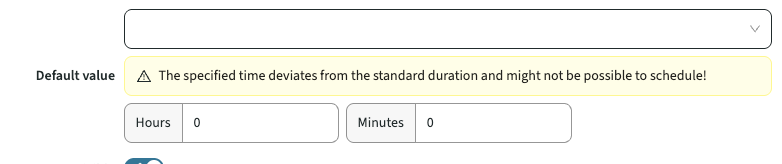
To provide a better user experience and a consistent display of time information a new type has been added name 'Minutes'. By selecting minute, the data entry and data display is using a time format. The data is still stored as a numeric value.
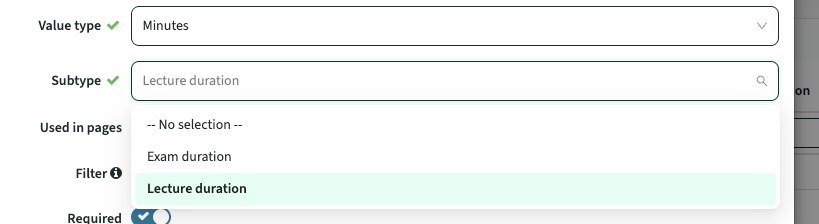
Configuration: when defining the custom-field, set the value type to Minutes, next as sub-type select the field that should be displayed using the time format.
The display format is shown in the image below, where the time information is entered using a hours and minutes separation. The display format in read-only mode is HH:MM.
Module (and some other) searches are responding too fast - CUR-2503
A change applied to the data-entry component for search was too responsive. It felt that almost before the character was typed the search was already executed. And each additional character immediately launched a new search. Causing difficulties in search and a bad user experience. This has been fixed, where the search is made less responsive and will wait a little time after a key stroke to allow the user to type a next character before starting a search.
As a user I want to add a relation that is found using the advanced search - CUR-2445
When using the advanced search to find a person to be assigned to a relation, the assignment didn't work. The fallback was that if the user was found, switch to the direct search and then assign the user. But the workaround is no longer required, since this has been fixed in this version.
The task contribution report should show the contribution in percentage - CUR-2366
A few releases ago the tasks-contribution report template is released, showing how many hours (staff from) an organisation contributes to each study. This version the report is extended to not only show the number of hours but also the contribution percentage per study.
The teacher-assign template should show the activity-type - CUR-2469
The teacher assign page offers the option to assign staff members to the defined activities. The page offers various filter options to select the activities and assign staff to those activities with one click. The filtering options are extended with the activity-type, allowing more variations in filtering the activities and assign the staff members.
The activity-card should respect the end date - CUR-2497
The activity-card shows field from the method-activity serie and assessment-activity-serie. In case a field has been given an end date, to configure it is no longer used, the field and its information were still shown. A fix is applied to force the activity-card respect the defined end date on fields.
The activity-grid should show the activity type on the tiles - CUR-2483
The tiles in the activity grid use to have a ‘header’ and a ‘caption’. The introduction of individual lesson names caused a change in the information display of the tiles. This was an unintended change and the display has been restored to the previous behaviour:
- Header: shows the ACTIVITY TYPE (name of the type, e.g. lecture, practical, written test.
- Caption: shows the LESSON NAME in case set, else show the ACTIVITY-SERIE CODE
As a user I want to search / filter on dates as if they are strings - CUR-2445
The search / filter option offered in the standard reporting for dates has been extended. Support is added to search as if the date is not a date, but as string. This means that a search on a part of the date will already provide results, e.g. search/filter on 13 will show dates like 13-10-2025, 13-01-2023.
Extend the copy of appraisal/method-scheme with support for individual assessment/method - CUR-2460
The option to copy assessment and method related date is extended. The appraisal and method-scheme will offer 2 copy buttons.
- The button shown on the assessment or method will only copy the assessment / method and its underlying activity-serie(s).
- The button shown on the highest level (appraisal / method-scheme) will perform the copy including all defined underlying assessments / methods.
While developing the new functionality the issue where the activity-serie name was not set after the copy is solved.
A form page based on activity-serie should show the desired fields - CUR-2422
To support the management of activity-serie information in a workflow, a custom form page based on the activity-serie is required. The support for using an edit page in the workflow was only supported using the default edit page showing all fields. Using a custom form page, to only select the desired fields, didn't show all available fields on the activity-serie. A change is applied to extend the selectable fields to all activity-serie fields and allow the usage of the custom form page with the fields set in a workflow.
The year roll-over should support roll-over of multiple faculties - CUR-2520
The year roll-over generated an error when creating the new year and rolling over all faculties in one go. The work-around is to copy one faculty at a time. The issue causing the error has been identified and is fixed. The year roll-over will support copying over all faculties in one action.
Multi-value Element based fields should be shown readable on read-only pages - CUR-2352
In a previous release the readability of read-only multi-value information has been improved. The values are displayed as bulleted options as improvement. It was highly appreciated, but it was noted that multi-value fields based on an Element used the 'old', less readable visualisation. This has been adjusted and all read-only multi-value fields will display in the same readable format.
As an authorised user I want to delete an appraisal - CUR-2420
An option has been added to support deletion of an appraisal using the standard authentication rules. To support and steer the deletion the following authentication rules are available:
- EDIT_APPRAISAL: Edit an existing appraisal
- DELETE_APPRAISAL: Delete an existing appraisal
- CREATE_APPRAISAL: Create a new appraisal
As a user I should be able to change the parent of an assessment - CUR-2474, CUR-2512
In the previous version the following change has been applied: Using the 'admin' tab of an assessment provides the option to change the parent. However, when saving the changed information, the change was not affected. It seemed that the parent was excluded from the save. This has been adjusted, so the assessment and its change parent will now be saved correctly.
A situation was found where the function gave an error and thus didn't function. The was caused by the fact a parent should be a 0-1 relation and should be configured as such (default setup). In this case the parent was accidentally set to multi-value. A change is made that will perform an additional check during start-up to validate if a default relation is accidentally changed to multi-value, and will correct this change.
As an admin I should be able to change the linked information - CUR-2474
In the previous version the (?) icon was added in the topbar providing the option configuring links to documentation. A third option offered, but not mentioned was the link to the accessibility information. In fact, the link was shown, but the underlying label and URL were not yet available.
The set of configurable links is:
- Navigation.Help.Docs.Url (renamed label for Static.Label.Manual.Url), used to define the URL to the documentation.
- Navigation.Help.Support.Url (new label), used to define the URL to the internal support info (FAQ) or support desk.
- Navigation.Help.Accessibility.Url (new label), used to define the URL to the internal support info (FAQ) or support desk.
In case the URL is defined empty or with only a - (dash), the menu item will not be shown. This to allow only showing relevant menu items with a link.
Security
An integral part of our development and build process is automatic scanning for known security vulnerabilities. The vulnerabilities will be fixed based on their impact, which means that in some cases an immediate hot-fix will be applied, and in other cases the vulnerability will be fixed in the current or next Sprint (release). The security section provides an overview of the vulnerabilities mitigated. For more information on reported vulnerabilities, see the central database of vulnerabilities.
Analysis impact CVE-2025-55182
A so-called zero-day vulnerability CVE-2025-55182 has been reported. Due to the impact and the possible requirement for an immediate hotfix the vulnerability has been analysed. The outcomes of the analysis was that the reported vulnerability did not have an effect, since the vulnerable part is not used and not immediate action (hotfix) is required.
The fix for the vulnerability is applied following the standard procedure to keep the used standard components up to date covering both access to new functionality, stay up to date with fixes and security patches.
Refer to the Workload Management manual for configuration guidance.